Have you ever wondered what actually happens when you type www.google.com or any website address into your browser and press Enter? It feels like the website appears instantly, but behind the scenes, a lot of amazing technology works together in just a few seconds. Understanding this process helps IT students understand the foundations of the internet, networking, servers, and how modern web applications function. This knowledge is simple, interesting, and very useful for your studies and future interviews.
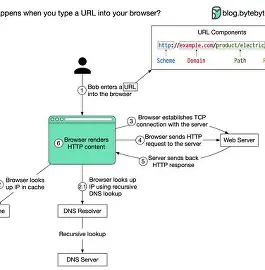
The moment you enter a URL, the browser first checks if you have already visited that website before. If yes, it tries to load some saved files (cache) to make the website open faster. If not, the browser asks an important question: “Where is this website located?” Because a URL is just a name, your computer needs the exact IP address of the server where the website is stored. To find this, your system sends a request to a DNS (Domain Name System) server, which works like a phonebook of the internet. The DNS server quickly returns the IP address of that site so your browser knows where to go.
Once the browser gets the IP address, it sends a request to the website’s server through the internet. This is called an HTTP or HTTPS request. It travels across routers, networks, data cables, and sometimes even underwater fiber cables to reach the website’s hosting server. The server receives your request and starts preparing the files you need—HTML pages, CSS, images, JavaScript files, and other data. This process happens so fast that it feels instant, but a huge network infrastructure is working behind it.
When the server sends the data back, your browser begins building the webpage step by step. First, it reads the HTML to understand the structure. Then it loads the CSS to add colors, fonts, and styling. After that, JavaScript runs to make the website interactive. Your browser also loads images, animations, videos, and other components. All these elements combine to display the final webpage that you see on your screen. This entire process—finding the server, requesting the files, receiving the response, and rendering the page—happens within milliseconds.
In the end, the simple action of typing a URL reveals the incredible power of the internet. It shows how devices, servers, networks, and protocols work together in perfect harmony to bring information to your screen. For IT students, understanding this process builds a strong foundation in networking, web development, and system design. The next time you type a URL, you’ll know that a whole world of technology is working behind the scenes to make your browsing experience smooth and fast.