



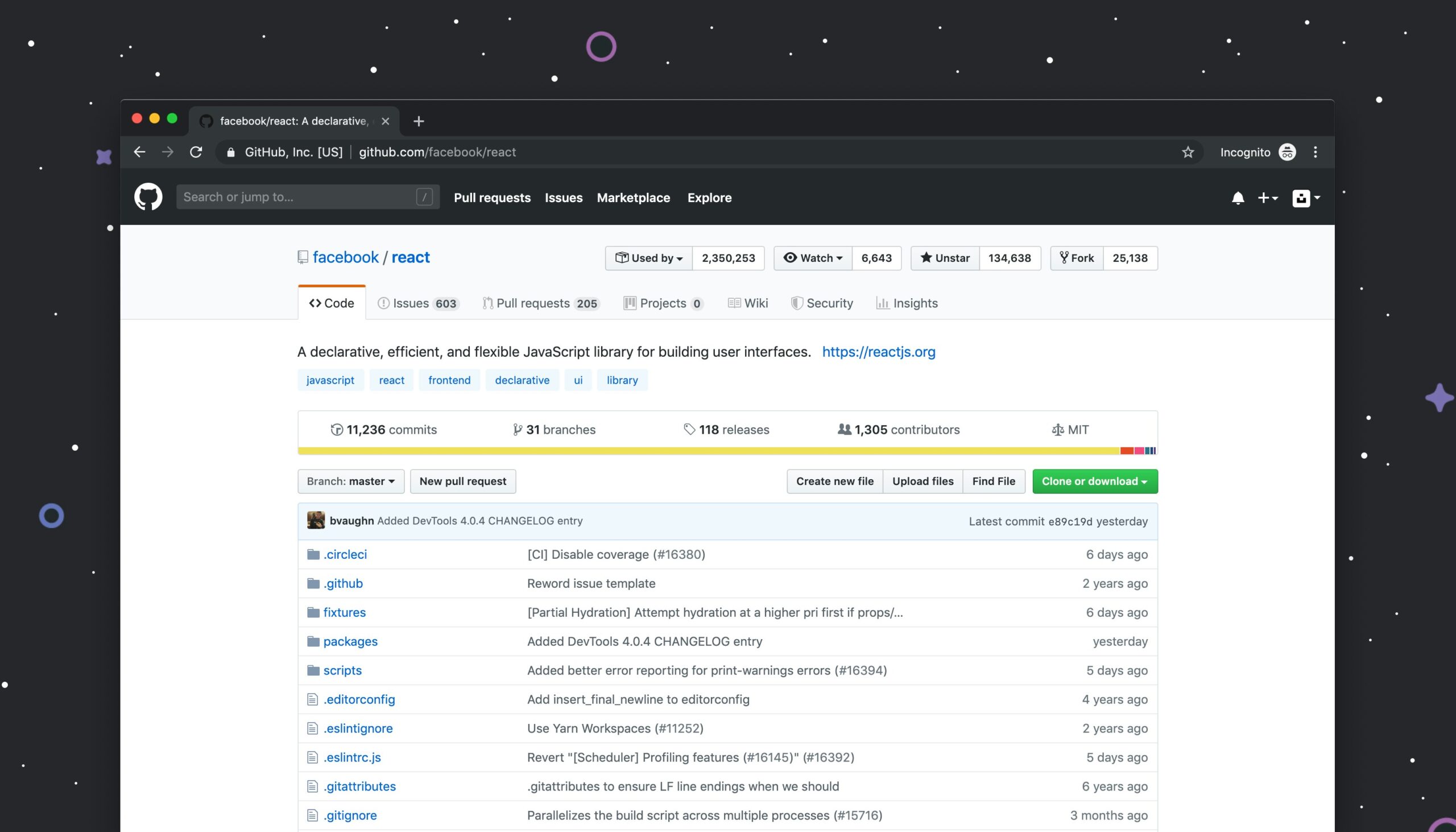
Understanding GitHub Basics
GitHub is a web-based platform designed for version control and collaborative software development, primarily utilizing Git as its underlying system. For student developers, understanding GitHub is essential, as it not only streamlines the process of project management but also fosters collaboration with peers. One of GitHub’s fundamental features is the repository, a storage space where your project files, documentation, and version history are kept. Creating a repository is straightforward; users simply navigate to their dashboard and click on the ‘New’ repository button, allowing them to set the repository name and description, and choose whether it will be public or private.
Version control is a pivotal concept linked to GitHub, enabling multiple developers to work on a project simultaneously without the fear of conflicting changes. This functionality revolves around several key elements, including commits, branches, and pull requests. A commit is a snapshot of your project at a particular point in time, serving as a history that allows developers to track changes, revert to previous states, and manage project evolution. Each commit includes a commit message, which describes the changes made, thus enhancing transparency among collaborators.
Branches play a crucial role in GitHub’s functionality by permitting developers to create separate lines of development within a repository. This is particularly beneficial when experimenting with new features or fixing bugs, as it keeps the main project branch stable. Once the changes in a branch are complete, developers can initiate a pull request, which notifies collaborators of the proposed changes and allows for discussion and review before merging them into the main branch. By mastering these GitHub basics, student developers can significantly increase their productivity and collaboration effectiveness in software development projects.
Setting Up Your GitHub Profile
Creating a strong GitHub profile is essential for student developers looking to showcase their skills and connect with the broader development community. The first step in this process is to set up an account on GitHub. Students should visit the GitHub website and register with a valid email address. Once registered, it’s crucial to personalize the profile to make a good first impression.
A professional profile picture is important as it adds a personal touch and helps users recognize you. It is advisable to use a clear, high-resolution image that reflects professionalism. This visual element, combined with the right username, can set the tone for how others view your presence on the platform. Choose a username that is simple, recognizable, and easy to remember, ideally incorporating your name or field of interest.
Next, writing a compelling bio is an essential aspect of your GitHub profile. The bio should succinctly summarize your background, skills, and interests in development. Highlighting specific programming languages, frameworks, or technologies you are proficient in can help differentiate you from other developers. Keep the bio concise, ideally within a few sentences, and ensure it reflects your enthusiasm for coding and ongoing learning.
In addition to a well-structured bio, including links to your projects is vital. These projects serve as tangible proof of your skills. Students should endeavor to showcase a variety of projects, whether they are personal, academic, or contributions to open-source initiatives. Furthermore, linking to relevant social media accounts, such as LinkedIn or personal blogs, can expand your visibility and create connections within the developer community. Having a strong GitHub profile can significantly enhance your networking capabilities and opportunities as a student developer.

Collaboration and Workflow on GitHub
GitHub is an essential platform for student developers looking to collaborate effectively on group projects. By utilizing Git and GitHub’s powerful features, students can manage their workflows systematically, ensuring that projects progress smoothly. One of the primary tools for collaboration on GitHub is the use of branches. When starting a new feature or fixing a bug, developers can create a separate branch from the main codebase. This allows individuals to work on distinct modifications without interfering with others’ contributions, thereby ensuring a clean project history.
When a developer completes their work on a branch, they can propose these changes using a pull request. This feature serves not only as a request for merging but also as a platform for discussion and feedback. By encouraging team members to review the changes made in the pull request, students can engage in constructive code reviews. This process is crucial as it allows developers to share knowledge, improve code quality, and maintain standards across the project.
Effective communication is vital in any collaborative environment. GitHub provides tools such as comments on commits, issues, and pull requests, which facilitate dialogue among developers. Students should use these tools to clarify doubts, suggest enhancements, and share insights, thus fostering a collaborative culture. Additionally, organizing the repository with well-defined issues and project boards can help streamline tasks. By clearly assigning responsibilities and tracking progress, teams can avoid confusion and delays. Regular meetings can further enhance communication, allowing developers to update one another about their contributions.
In conclusion, leveraging GitHub for collaboration can significantly enhance the efficiency of group projects for student developers. By understanding branching, pull requests, and effective communication strategies, students can create a more organized and productive workflow, ensuring successful project outcomes.
Finding and Contributing to Open Source Projects
Open source projects serve as an invaluable resource for student developers, allowing them to engage with real-world coding environments while enhancing their programming skills. Participating in such projects not only helps students learn more about specific technologies but also allows them to contribute to community-driven initiatives that can have a significant impact. To find suitable open source projects, students should explore platforms like GitHub, GitLab, or Bitbucket, where numerous repositories await their attention. Utilizing search filters based on programming languages, topics, or popular repositories can significantly streamline this process.
Another effective way to discover projects is through websites dedicated to open source development, such as Up For Grabs, CodeTriage, and First Timers Only, which curate lists of projects specifically geared towards newcomers. These platforms often highlight issues that are beginner-friendly, making it easier for students to dive in without feeling overwhelmed. Additionally, by following relevant hashtags on social media platforms, such as #OpenSource or #GitHub, students can stay updated on trending projects and community news.
Once students identify projects of interest, contributing effectively is crucial. Begin by thoroughly reviewing the project’s documentation and understanding how the codebase is organized. This foundational knowledge can greatly enhance the quality of contributions. Additionally, it is advisable to start with smaller tasks, such as fixing minor bugs or improving documentation, before moving on to more complex features. Engaging actively with the community through pull requests, comments, and discussions demonstrates commitment and fosters positive relationships with project maintainers.
Conclusion
Effective communication is key in open source collaboration. Students should ask questions if they encounter challenges and provide feedback on others’ contributions politely and constructively. By sharing insights and engaging in discussions openly, student developers can create a supportive network that promotes both personal growth and broader community development. Ultimately, involvement in open source projects can pave the way for future opportunities in the tech industry, presenting students with practical experience and valuable connections.
Read Our Latest Blog
Building a Portfolio Website to Showcase Your Skills
Phone Number: +91-7488456170
Email ID: abhishek@eepl.me
Our Platforms:
Digilearn Cloud
EEPL Test
Live Emancipation
Follow Us on Social Media:
Instagram – EEPL Classroom
Facebook – EEPL Classroom
Stay connected and keep learning with EEPL Classroom



